For organizations running Dynamics AX 2012, the move to Dynamics 365 Finance & Operations is not just a version upgrade. It is a fundamental shift in how the platform works. The user interface may look similar, and the core business logic carries forward, but underneath, nearly everything about how the system is built, deployed, customized, and maintained has changed.
Having guided organizations through this transition, I’ve found that the teams who understand these architectural differences early make better decisions throughout the project. This guide walks through the most significant changes and what they mean for your team.
The Architecture Shift: From Your Servers to Microsoft’s Cloud
In AX 2012, you own and manage the entire technology stack: your database servers, your Application Object Servers (AOS), your SQL instances, and your SharePoint integrations. All of it lives on infrastructure that your team controls. This gives you tremendous flexibility, but it also means you are responsible for everything, including patching, performance tuning, scaling, backups, and disaster recovery.
Organizations with complex environments often end up with sprawling infrastructure. It is not uncommon to see companies running twenty or more AOS instances, having added servers over the years to address performance issues. In many cases, the additional hardware masks underlying problems rather than solving them. The juice, as I often say, has not been worth the squeeze.
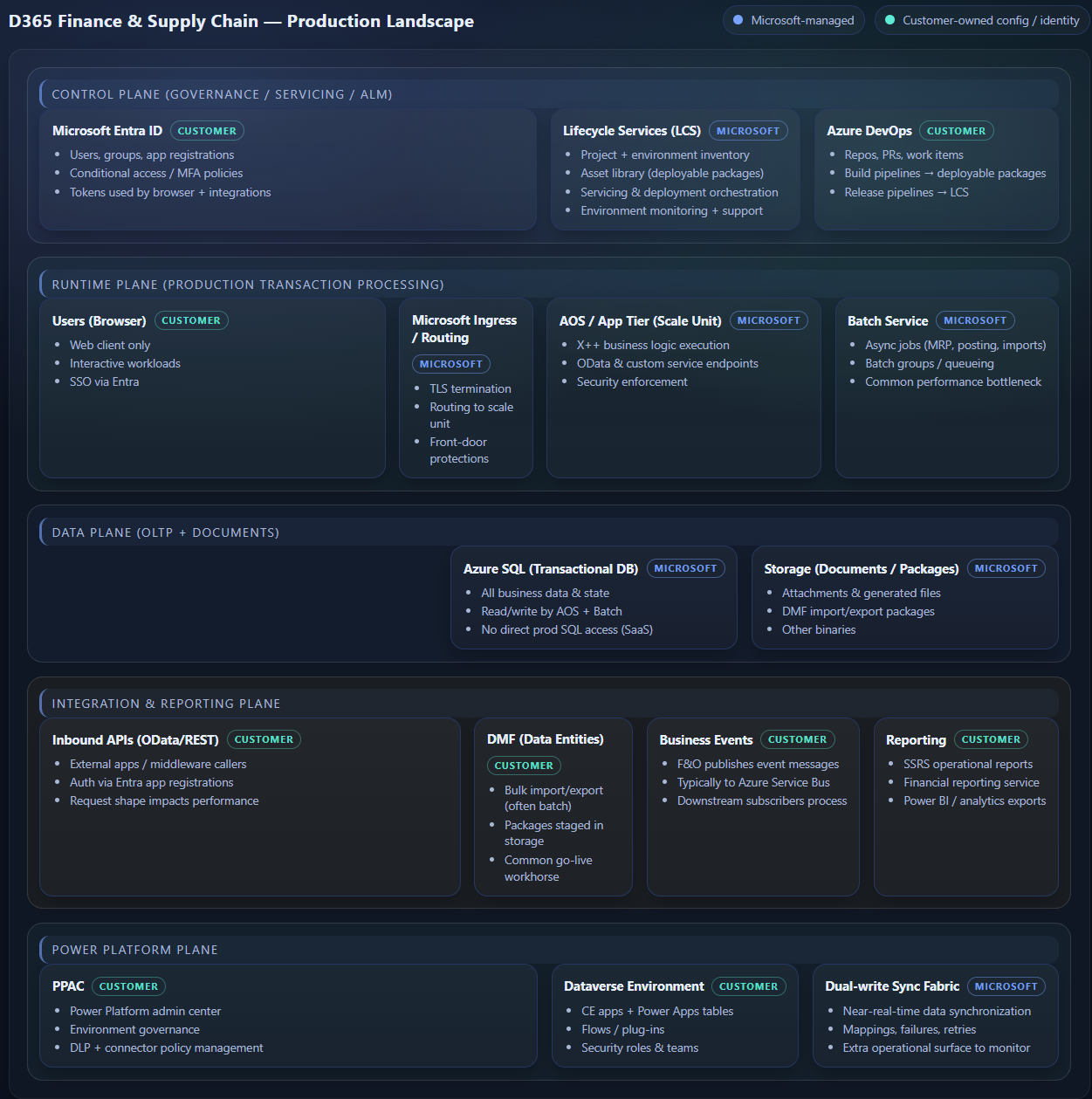
D365 Finance & Operations moves the entire infrastructure to Microsoft’s Azure cloud. Microsoft manages the servers, the database, the operating system, and the platform updates. You access environments through Lifecycle Services (LCS), though Microsoft is currently transitioning management to the Power Platform Admin Center.
Your environments are organized into tiers. Tier-1 is a single-box development environment, essentially a virtual machine running SQL Server locally, designed for developer use rather than multi-user testing. Tier-2 through Tier-5 are true cloud sandbox environments backed by Azure SQL, with increasing capacity for acceptance testing and training. Your production environment is managed separately by Microsoft, with guaranteed uptime and automated failover.
What this means practically: your team no longer spends time managing servers. But you also give up some control. You can’t tune SQL directly, you can’t add AOS instances on the fly, and you’re dependent on Microsoft’s infrastructure for performance. For most organizations, this trade-off is well worth it.
Code Deployment: From Hours of Downtime to Minutes
If you’ve been through an AX 2012 code deployment, you know it’s an event. The best-practice process involves copying your production database to a test environment, deploying and compiling the changes in test, running a full CIL compilation, synchronizing the database, exporting the model, importing it to production, draining all user sessions, stopping all AOS instances, taking a final backup, and then carefully bringing the system back online.
This process can take hours. It requires careful coordination, scheduled downtime, and a healthy dose of caution. And even when you follow every step correctly, CIL compilation in AX 2012 introduces a real element of unpredictability.
The CIL Problem
CIL, or Common Intermediate Language, is the compiled .NET version of AX’s X++ code. It runs faster than interpreted code, but it is fragile. When you do an incremental CIL compilation (which is the default), any failure in the compilation process happens silently. There is no error message. You have no way of knowing something broke until users start experiencing strange behavior in production: wrong error messages, unexpected results, or processes that simply stop working.
This is why experienced AX administrators insist on full CIL compilations during deployments and avoid deploying small, isolated code changes directly to production. It is a house of cards: fast when it works, but unpredictable when it does not.
How D365 Changes This
In D365, the deployment process is dramatically simpler. Code is packaged into deployable units that are pushed through LCS. Microsoft handles the database synchronization, the compilation, and the environment management. Deployments that took hours in AX 2012 can complete in minutes in D365, often with minimal or no user downtime.
The CIL problem disappears entirely. D365 uses a different compilation model that does not suffer from the same silent failure modes. And because Microsoft controls the deployment pipeline, many of the manual steps that introduced human error in AX 2012 are automated away.
Customization: From Overlayering to Extensibility
This is arguably the most significant change between AX 2012 and D365, and the one with the biggest long-term implications for your organization.
The Overlayering Model (AX 2012)
AX 2012 gives developers nearly unlimited flexibility through a concept called overlayering. The system organizes code into layers, with Microsoft’s base code at the bottom, then partner layers, ISV layers, and customer layers on top. A developer can override virtually any piece of Microsoft’s code by placing their own version in a higher layer.
This sounds powerful, and it is. You can mold the application to fit your business rather than molding your business to fit the application. The problem is what happens over time. Every overlayered customization creates a potential conflict with future Microsoft updates. When Microsoft changes the base code that you’ve overlayered, your customization may break. Or worse, it may silently produce incorrect results.
The result is that major version upgrades in AX could take years. Organizations that heavily customized their systems found themselves unable to take Microsoft’s updates without extensive regression testing and code remediation. Some companies spent more time maintaining their customizations than they did getting value from them.
The Extensibility Model (D365)
D365 replaces overlayering with extensibility. Instead of replacing Microsoft’s code, developers write extensions that execute before or after Microsoft’s methods using a pattern called Chain of Command. The critical difference: Microsoft’s code always runs. Your extension adds to it but cannot replace it.
This trade-off is intentional. You lose some of the raw flexibility that overlayering provided. In exchange, you gain the ability to take Microsoft’s platform updates multiple times per year without your customizations breaking. Upgrades that once took years can now happen in weeks or even days.
For organizations planning a migration, this shift requires a change in mindset. Some customizations that were straightforward in AX 2012 may need to be rethought for D365’s extensibility model. The earlier your team understands this constraint, the better your migration planning will be.
Data Management: New Tools, New Processes
D365 introduces a fundamentally different approach to environment and data management. Moving configuration data to production uses Data Packages through the Data Management Framework (DMF). Refreshing non-production environments with production data is handled through LCS with a few clicks, though certain sensitive data is automatically excluded and custom configurations typically require manual setup after a refresh.
When things go wrong in production, D365 offers point-in-time restore with 28 days of history at fifteen-minute intervals. This is a significant improvement over AX 2012, where recovery depended entirely on your backup strategy and the discipline of your operations team.
But the real challenge with environment refreshes is not the restore itself. It is what happens after. When you copy production data into a development or test environment, that data arrives with live integration endpoints, real customer PII, external system connections, and hundreds of environment-specific configurations that all need to be updated. Do it by hand and you are looking at hours of tedious work, with real risk of pointing a test environment at a production integration or exposing sensitive data to developers who should not have it.
This is exactly the problem we built Clone Commander to solve. Clone Commander automates the entire post-refresh process for D365 Finance & Operations: it obfuscates sensitive customer and vendor data (names, addresses, banking information) to keep you compliant with GDPR, HIPAA, and CCPA requirements; it shrinks your database footprint so development environments are not choking on production-sized data; and it automatically updates every integration endpoint, configuration setting, and external connection to match the target environment. What used to be an eight-hour manual process with a checklist and a prayer becomes an automated workflow that runs in a fraction of the time with a full audit trail.
Clone Commander covers every D365 Finance & Operations instance in your landscape for a thousand dollars a month. That is every sandbox, every dev box, every UAT environment, all under one flat fee. The ROI is extraordinary: a full year’s license pays for itself the first time you use it instead of doing a manual refresh. When you factor in the risk you are eliminating (accidentally emailing real customers from a test environment, exposing PII to your development team, or pointing a sandbox at a production integration), it is not even a close call. You can find it on Microsoft AppSource or at rysetechnologies.com.
Integration and Reporting: A Broader Toolkit
AX 2012 offered a solid but aging set of integration options: AIF for document-based integrations, WCF SOAP services, the .NET Business Connector for RPC-style calls, and DIXF for data import/export. Reporting relied on SSRS, Management Reporter, OLAP cubes, and in many cases, direct SQL queries against the database.
D365 modernizes this toolkit significantly. OData provides REST-based data access. Business Events enable event-driven integrations. Bring Your Own Database (BYOD) lets you replicate data to an external SQL database for reporting. Dual Write connects D365 Finance & Operations with Dataverse for CE integration. Power BI integration is dramatically improved, and Electronic Reporting (ER) provides a flexible framework for document generation.
Perhaps most importantly, D365 discourages direct SQL access to the production database, something that was common practice in AX 2012. While direct SQL queries were fast and convenient, they bypassed the AOS’s security and business logic layers, creating both compliance risks and performance issues. D365’s architecture pushes organizations toward proper API-based integration patterns.
What This Means for Your Migration
The move from AX 2012 to D365 is less of an upgrade and more of a re-implementation on a modern platform. The business logic and functional capabilities carry forward, but the technical foundation is fundamentally different.
Organizations that approach this as a simple lift-and-shift tend to struggle. Those that take the time to understand the architectural differences, and use the migration as an opportunity to re-evaluate their customizations, integrations, and processes, tend to get significantly more value from the new platform.
- Audit your customizations early. Identify which AX customizations are still needed, which can be retired, and which will need to be redesigned for the extensibility model.
- Plan your integration strategy. Map every AX integration and determine the appropriate D365 equivalent. Direct SQL integrations will need to move to OData, BYOD, or Business Events.
- Invest in your team’s learning. The D365 platform is different enough that your existing AX expertise, while valuable, will need to be supplemented with new skills, particularly around LCS, Azure DevOps, and the extensibility model.
- Don’t underestimate the cultural shift. Moving from an environment you fully control to a Microsoft-managed cloud platform changes how your team works. Plan for that adjustment.
The transition from AX to D365 is a significant undertaking, but it is also a genuine opportunity. Organizations that approach it with clear eyes, understanding both what they are gaining and what is changing, are the ones that come out ahead.
────────────────────────────────────────
Steven Settle is Managing Partner at Ryse Technologies, a Microsoft Dynamics partner specializing in D365 Finance & Operations, Power Platform, and Azure solutions. With over 25 years of experience in the Dynamics ecosystem, he helps organizations navigate complex ERP landscapes and modernize their business technology.



.png)